UNATION - Discover Events
- 3.0
- Rating
- 100.00K
- Installs
- Free
- Price

 Analysis by App-foxy
I tested UNATION - Discover Events as an events app for finding things to do nearby and handling tickets in the same general space. My first impression was that it is most useful when I am open to discovering an activity rather than searching for one very specific event. It gives a household, a group of friends, or even one person a practical place to browse local possibilities, but it works best when everyone agrees on who is choosing, who is paying, and who is actually attending.
The app is free, aimed at everyone, and developed by UNATION, INC. It has passed the early-experiment stage, having been available since December 23, 2015, and its current version is 7.9.8. The Android listing shows over 100 thousand installs, which suggests a modest but established audience rather than the reach of the largest ticketing platforms. Its average rating is 3.0 from roughly 240 ratings, so I would approach it as a useful discovery tool with some rough edges, not as a flawless replacement for every event service.
How UNATION fits into a shared household routine
I find UNATION most useful when a household has a free day but no shared plan yet. One person can bring a few nearby event ideas to the table, giving everyone something concrete to discuss; the next section looks at how to turn that browsing into a simple, accountable routine without letting an interesting listing become an unplanned commitment.
You May Also Like

 Blood Strike: 2.5 Anniversary
Blood Strike’s Loadouts Turn Every Drop Into a Tactical Gamble
A close look at Blood Strike’s custom loadouts: how fast access to signature weapons reshapes its battle royale rhythm, rewards preparation, and narrows the gap between fights.

 Pandora - Music & Podcasts
Pandora’s Music Is Easy to Start, but Harder to Recover
Pandora’s strength is its low-effort path from a seed to a station. Its weak spot is how much confidence it asks you to place in connection, setup, and quiet recovery.

 8 Ball Pool
 Is Built on Rivalries, Rematches, and Routine
A close look at the rivalries, rematches, shared routines, and unanswered safety questions that turn a quick pool match into a persistent mobile community.

 Samsung Music
’s Quiet Strength Is Playing What You Already Own
Its reach comes less from spectacle than from dependable access to a personal library. That simplicity is both the app’s strongest retention engine and its ceiling.

 AccuWeather: Weather Radar
AccuWeather Review: A Quick, Clear Forecast for Everyday Decisions
For everyday plans, the best forecast is the one you can understand quickly. AccuWeather makes rain timing, radar, and local conditions easy to act on, with a few trade-offs.

 Hill Climb Racing
Why Hill Climb Racing Still Turns Crashes Into One More Run
A tiny car, a bumpy hill and one more upgrade: Hill Climb Racing keeps resurfacing because its simple chaos makes every near-miss feel personal.
More From Our News Desk



One person can browse while the household decides together
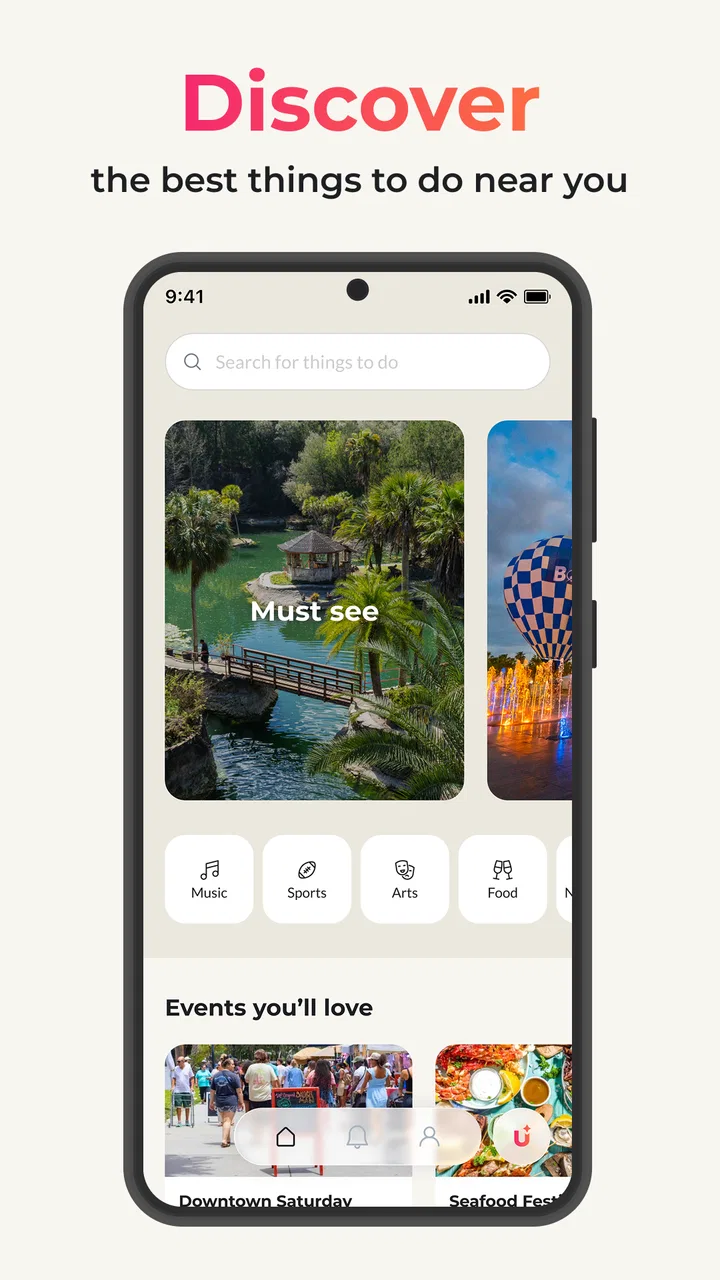
A realistic use case is a Saturday morning when nobody has made plans. I can open the app, look through nearby events, and bring a few possibilities to the rest of the household: perhaps something suitable for children, an activity for adults, or a ticketed outing that fits the available time. That is a better starting point than asking everyone to search separately, because the app is designed around discovering events near me rather than only looking up a known performer or venue.
The important boundary is that browsing is not the same as committing. I would use the app to create a shortlist, then confirm the date, time, location, ticket conditions, and suitability with everyone involved before buying anything. This matters particularly when one person manages a shared phone or tablet. A child might see an attractive event while browsing, but that does not mean the household has agreed to attend or spend money.
For a couple or group of friends, the app can also be useful when tastes differ. Instead of arguing over one idea, each person can suggest an event and compare the practical details. I found that this kind of browsing works better when I treat the app as a conversation starter. It is less helpful if I expect it to make the final decision for the group.
Separate the discovery stage from the ticket stage
The strongest household workflow is to divide the process into two stages. First, browse and save the details somewhere everyone can see, such as a shared message. Second, decide who will purchase and how the tickets will be distributed. This avoids a common problem with event apps: one person finds something appealing, another person assumes it is confirmed, and nobody is sure who holds the tickets.
UNATION brings event discovery and buying or selling tickets into one app experience, which can reduce switching between services. That convenience is valuable when the event is already represented clearly. Still, I would not rush through checkout simply because the purchase path is close at hand. A household should agree on the total plan before one account becomes responsible for the transaction.
For resale or ticket selling, the same rule applies in reverse. The person listing a ticket should be the person who knows its exact status and can answer questions about it. I would avoid letting several family members manage the same listing casually. Shared access can create confusion over whether a ticket is still available, already promised, or already sold.
What setup feels sensible on a shared device
Because this is an app that can involve event decisions and ticket transactions, I would begin by identifying the primary user. On a shared device, that should normally be the adult who will handle purchases, ticket details, and any communication connected with an event. Other household members can participate in browsing without needing to become the person responsible for the transaction.
I would also avoid assuming that a shared device means a shared account. Account boundaries matter even when everyone trusts one another. The person who buys a ticket should know which account is signed in and where confirmation information will appear. Before handing the phone to someone else, I would check that no purchase screen, personal message, or ticket display is left open.
This is not a criticism unique to UNATION; it is simply more important here because event planning can quickly turn into a financial commitment. The app is free to install, but events and tickets are not automatically free. I would explain that distinction plainly to younger users: downloading the app costs nothing, while an event discovered inside it may still require payment.
Coordination is useful, but it still needs a human plan
In my experience, the app is better at helping me find options than at replacing a household calendar or group chat. Once an event is selected, I would record the agreed time, meeting point, transport plan, and ticket holder outside the discovery process if necessary. That extra step may feel old-fashioned, but it prevents the app from becoming the only place where important arrangements exist.
A simple workflow works well: one person searches, the group discusses two or three realistic choices, one adult confirms the details, and the purchaser shares the final information with attendees. This is especially useful when the event is for people using different phones. The app may help one person discover and obtain tickets, but coordination still depends on sharing the relevant information with the rest of the group.
For a group outing, I would also decide in advance whether everyone is buying separately or whether one person is buying for the whole group. Buying together can make the plan easier to track, but it also places more responsibility on one account. Separate purchases give individuals more control, though they can make it harder to know whether everyone has completed the process. UNATION does not remove that social trade-off; it simply puts event discovery and ticket activity closer together.
Age context and trust deserve attention
The Everyone content rating makes the app broadly approachable, but that should not be confused with every event being suitable for every age. An event listing can be family-friendly, adult-oriented, crowded, late at night, or otherwise unsuitable for a particular child even when the app itself is rated for everyone. I would check the event information and use adult judgement rather than relying on the app’s general age label.
For younger household members, I would encourage browsing with an adult when tickets or unfamiliar venues are involved. The useful lesson is not simply “find something nearby,” but “check what the event is, where it happens, who is going, and how the plan works.” That approach keeps discovery fun without allowing an appealing listing to become an impulsive commitment.
Trust is also relevant when buying or selling tickets. I would be cautious about treating a listing as automatically risk-free just because it appears inside a polished app. Before completing a transaction, I would read the event and ticket information carefully, confirm that the details match the group’s plan, and keep the purchaser involved from start to finish. The app can organize the process, but it cannot make every judgement on behalf of a family.
Where it beats the usual alternatives
The usual alternative is to search the web, check venue pages individually, and then move to a separate ticket provider. That approach can be thorough, but it is slow when I do not yet know what I want to do. UNATION’s main advantage is the discovery mindset: I can begin with nearby events and explore ideas instead of constructing a search from a performer, venue, or exact date.
It can also be more convenient than relying only on a general social network. Social feeds are good at showing what friends mention, but they are not always organized around event details and ticket actions. UNATION is more focused on the outing itself. That focus makes it a sensible first stop for weekend planning, local exploration, or finding an activity to suggest to a group.
On the other hand, a dedicated venue or ticketing service may be better when I already know exactly what I need. If I am looking for one specific event, want a highly detailed seating view, or need a particular venue’s own information, a specialized alternative may provide a more direct path. UNATION feels strongest at the beginning of the decision, not necessarily at every stage of a complicated purchase.
Small habits that make the app more useful
My first practical tip is to search with the household’s real constraints in mind. Instead of browsing endlessly, I would decide whether the priority is distance, age suitability, timing, or a shared interest. This turns a broad discovery app into a more manageable planning tool and reduces the chance of presenting the group with attractive but impractical options.
My second tip is to treat event details as something to verify before sharing a final plan. I would copy the exact event name, date, location, and ticket holder into a group message. That creates a clear reference for people who are not using the same device and helps avoid the mistake of forwarding a vague screenshot with no context.
My third tip concerns ticket selling. If I were listing a ticket, I would first settle who is authorized to sell it and keep the listing status visible to that person. On a shared device, casual browsing by several people can become risky when one person assumes another has updated the listing. A single accountable seller is much safer than an informal rotation.
A fourth useful habit is to keep discovery separate from permission. Children can help choose between ideas, but an adult should decide whether the event fits the family’s schedule, budget, and supervision plan. That gives the app a positive role in household participation without turning it into an unplanned purchasing channel.
Limitations I noticed in the overall experience
The 3.0 average rating is a reminder to keep expectations measured. A discovery app depends heavily on the quality, clarity, and freshness of the events it surfaces. If the nearby selection does not match my interests, the experience can feel less valuable than a direct search. The app is only as useful as the local options it helps me find.
I also would not rely on it as the sole record of a group’s arrangements. Ticket information, meeting plans, and household responsibilities can become scattered when several people share one device or one account. That is a coordination issue rather than a reason to dismiss the app, but it means I need a simple external system for the final plan.
Another limitation is that convenience can encourage premature decisions. Because discovery and ticket activity sit close together, the distance between “that looks interesting” and “we are committed” may feel shorter than it should. I think the app is best used with a deliberate pause before purchasing, especially when the outing involves several people or younger attendees.
Who should use it, and who should choose something else
I would recommend UNATION to someone who likes exploring local possibilities, often plans casual outings, or wants one place to begin looking before discussing options with friends or family. It is particularly suitable for the person in a group who naturally organizes weekends and wants to turn a vague “what should we do?” into a shortlist of real events.
I would be more cautious recommending it to someone who only attends major, preselected events and already knows the exact ticket provider they prefer. That person may find a specialized service faster. I would also suggest another approach for a household that expects detailed parental controls, separate child profiles, or formal family purchasing permissions. I would not assume those boundaries are provided simply because the app is rated for everyone.
People who sell tickets frequently should also consider whether a dedicated marketplace gives them the workflow and oversight they need. For occasional discovery or a straightforward ticket transaction, UNATION can be convenient. For high-volume activity, complex group management, or strict record keeping, a more specialized tool may be the better fit.
My household verdict
After using it as a planning aid, I see UNATION as a practical starting point for shared event discovery rather than a complete household coordination system. Its free access, broad age rating, and focus on nearby activities make it easy to introduce into a family or group routine. The ability to discover events and handle ticket activity in one place is genuinely useful when nobody has a firm plan yet.
My recommendation comes with clear boundaries: let one accountable adult handle purchases, discuss events before committing, and share the final plan outside the app when several people are involved. Those habits make the experience more dependable on a shared device and reduce confusion over accounts, tickets, and attendance.
In the end, I would keep it installed if I regularly wanted ideas for local outings and was comfortable doing a little coordination myself. I would not make it the only source of event information or assume that its general Everyone rating settles questions about a particular activity. Used as a discovery companion, it has a worthwhile place in a household’s planning routine; used as an automatic decision-maker, it asks for more trust than I think it should receive.
FAQs for UNATION - Discover Events
01What is UNATION and how does it work?
UNATION is an event discovery platform that helps users find exciting events happening near them. It offers a comprehensive listing of activities ranging from concerts, festivals, and family-friendly events to networking opportunities and local gatherings. Users can browse events based on their interests, date, or location, making it easy to plan outings and connect with their community.
02Is UNATION free to use, or does it require a subscription?
UNATION is free to download and use. Users can access the basic features without any cost, such as browsing events and saving favorites. However, some advanced features or premium content might require in-app purchases or a subscription. Always check the app's details in the store for any potential charges.
03How accurate is the event information provided by UNATION?
UNATION strives to provide accurate and up-to-date event information. The app aggregates data from various sources, including event organizers and local venues. While it does a great job of keeping listings current, users are advised to double-check details on the official event websites or contact organizers directly to confirm information.
04Can I use UNATION to create and promote my own events?
Yes, UNATION allows users to create and promote their own events. Event organizers can easily list their events on the platform, reaching a broad audience interested in local activities. By using UNATION, organizers can manage event details, track attendance, and engage with potential attendees, enhancing visibility and participation.
05Does UNATION offer personalized event recommendations?
UNATION offers personalized recommendations based on user preferences and past interactions. By setting your interests and allowing location access, the app can suggest events that match your tastes. This feature ensures that you never miss out on events that align with your hobbies or social calendar, providing a tailored experience.
Pros
- Easy-to-use interface for quick event discovery.
- Personalized event recommendations based on interests.
- Option to save events for future reference.
- Integrated map for easy venue navigation.
- Social sharing features to invite friends easily.
Cons
- Limited event coverage in smaller cities.
- Requires account creation for full access.
- Some features need stable internet connection.
- Occasional in-app advertisements.
- Event details sometimes lack comprehensive info.

UNATION - Discover Events
Gallery